A citation palette that stays beside your paper.
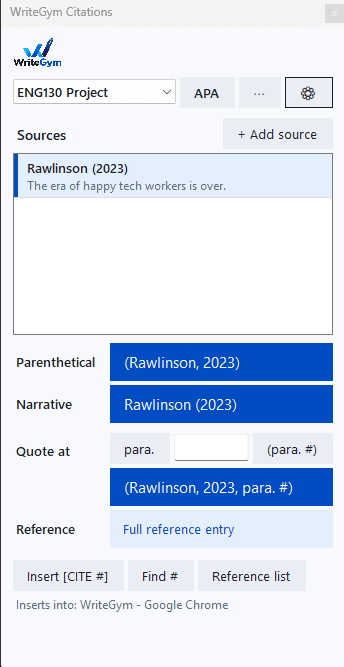
Save a source once. After that, click a button to insert an APA or MLA citation, a quote with the page number, or the full reference entry, right where your cursor is — in Word, Google Docs, TextMaker, almost any app. You never have to remember the author, the year, or where the commas go.
No account. No cloud. No AI.It doesn't write a word of your paper. It just handles the punctuation.
Neither needs an administrator password, so both work on school and library PCs. Windows only for now; see the note on Mac below.
Windows will show “Windows protected your PC”the first time you open the installer. That screen appears for any program that isn't signed with a paid certificate and hasn't been downloaded by thousands of people yet — this is a small, new tool, and it isn't signed. Click More info, then Run anyway.
If you'd like to check the file yourself first, the SHA-256 checksums are at the bottom of this page; in PowerShell, Get-FileHash on the downloaded file should match.
How it works
Add a source
Paste the citation your library database gives you (Gale, EBSCO, ProQuest all have a Cite button) and it fills the form. Or pick the type and type it in. A preview shows exactly what will be pasted.
Click into your paper
Where the citation goes. The palette remembers which window you were typing in — the bottom line says "Inserts into: …".
Click a button
Parenthetical, narrative, a quote with the page, or the full reference entry. The button shows the exact text it will insert, then pastes it at your cursor.
Switch styles any time
Click APA or MLA next to the paper name. Your saved sources don't change; only the formatting does. Each paper keeps its own source list.
What each button inserts
APA 7 and MLA 9
Handled for you
- ✓Journal articles, books and chapters, webpages, newspaper and magazine articles, reports and government documents
- ✓One, two, and three-or-more authors (et al.), group authors, 21+ authors
- ✓No date (n.d.), no author (the title moves up), suffixes, hyphenated initials
- ✓DOIs cleaned up to https://doi.org/…, en-dash page ranges, edition ordinals
- ✓2023a / 2023b when one author has two works in a year; reference lists sorted the right way
- ✓MLA: day-month-year dates, pp. 207-17, "---." for a repeat author, the database as a second container
- ✓Pastes with italics and a hanging indent in the font your paper uses — or plain text if you prefer
Keyboard shortcuts — work from inside Word, Google Docs, any app
If another program already uses one of these, the tool switches to Ctrl+Alt+Shift+letter; the tooltips always show what works on your PC.
Your sources stay on your PC
The tool makes no network calls. Sources are saved in a plain JSON file in your AppData folder (with a backup copy). Nothing is sent to science.learngym.app or anywhere else.
Safe to use for class
It formats citations from details you enter. It can't write, summarise, or paraphrase anything. There is no AI in it — the formatting is plain code, tested against APA and MLA examples.
Mac?
Not yet — it's built on Windows and there isn't a Mac to build it on. In the meantime, Homework checks the citations in your draft against what the assignment asks for.
Releases
- First release. APA 7 and MLA 9; journal articles, books, chapters, webpages, newspaper and magazine articles, reports.
To update, run the newer setup file over the old one. It closes the running copy, replaces it, and keeps your saved sources. To remove it: Settings → Apps.
SHA-256 checksums
a21fea16c157c3f4d279f5841c17d8fac66c87f09ceb557a86456624941fcfd4  WriteGym-Citation-Tool-Setup.exe
208a39d2cb68a6e802e73a4d7f456a5b104a889ac9878ae97e9586fd94e530e2  WriteGym-Citation-Tool-Portable.zip